The school platform · Made in Germany

School that brings everyone together.

Teaching, communication and organisation in one place, for students, teachers and parents. So there’s more time for learning.

No obligation, by video or on siteWe get back to you within 24 hours with a proposed date.

app.wecreate-campus.com
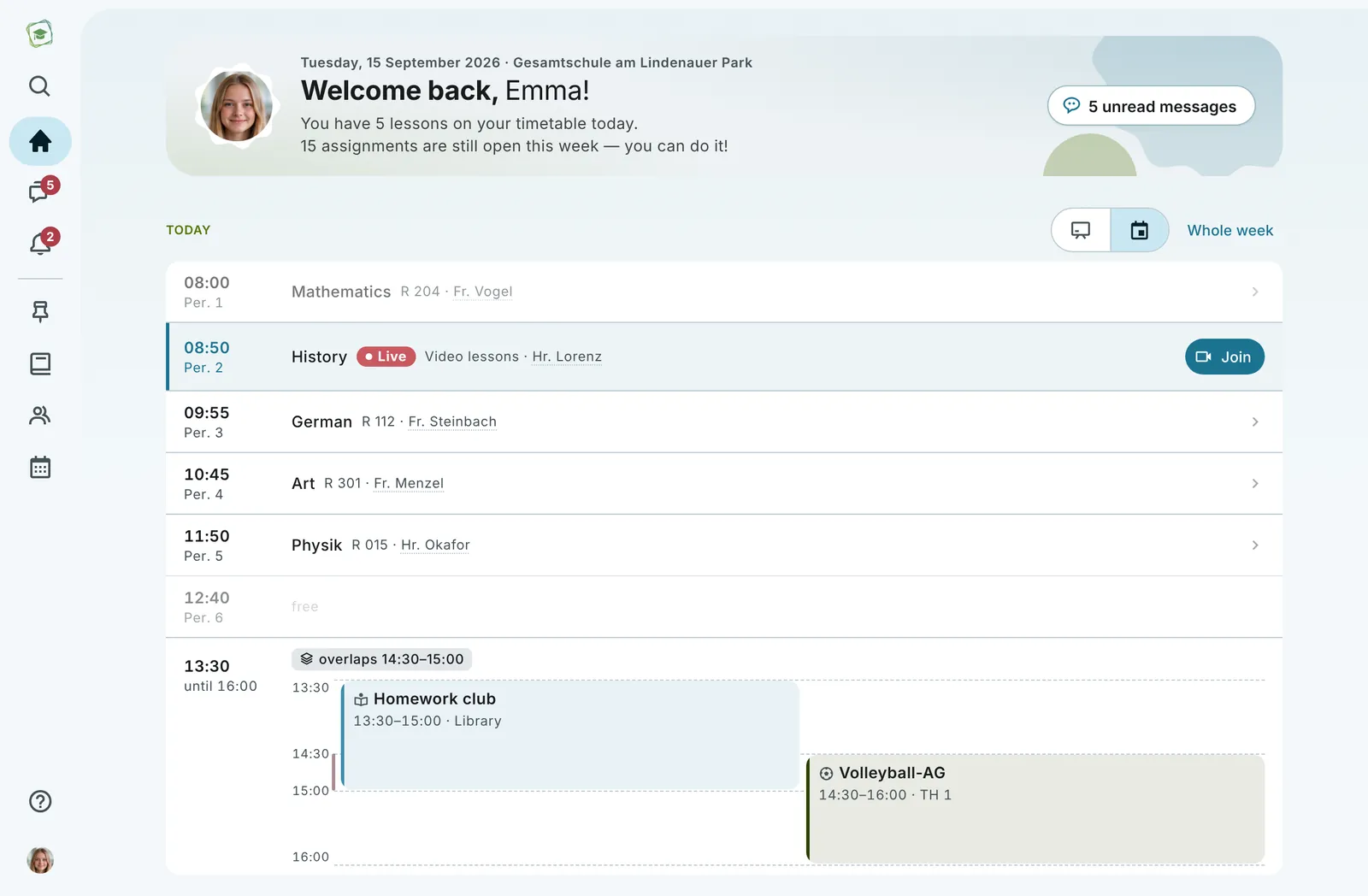
Emma’s home page: welcome, today’s timetable with a live lesson and afternoon activities
View from the platform · sample data
100%GDPR-compliant
0Ads & trackers
5Languages incl. Arabic script
1Login for everything
Developed & hosted in GermanyWeCreate Campus GmbH i. G., Leipzig
Connected to school administrationDaily sync with a log
Low-barrierSimplified view for younger classes
Messages can be translatedChats and parent letters in the family’s language
One platform instead of ten tools

No switching between apps.No note in the school bag.No “did you see that?”

That is the difference one platform makes: not more features, but less friction.

What a school day with WeCreate Campus looks like.

Emma from 8a, her maths teacher Ms Vogel, her parents and the school office: they all see the same platform, yet each only what concerns them. Open the day to see it in action.

Features

Everything a school needs, digitally.

What Emma, Ms Vogel and the Weber family use on this Thursday is no jumble, it is rooms, plans and conversations that belong together.

app.wecreate-campus.com · Mathematics 8a
Mathematics 8aCourse · STEM · 26 members
Lessons

Every subject its own tidy space.

Learning units, materials, assignments and tests — structured instead of scattered.

Which of these workflows would you like to see at your school?In the demo we walk through them using your own use cases.
Request a demo
New in this release

Learning you can see.

Learning map, self-assessment and coaching work together: students see where they stand, teachers see where the class stands, and the conversation turns it into a next step.

For students

“I can” goals instead of grade columns.

Within each subject, a grid shows the goals by competence area and by level: basic, standard and expert. Progress comes from completed sections and self-checks.

Schematic illustration. We show the real view in the demo.
Parent letters

Parent letters that come back.

From hiking days to class trips: teachers write the letter in three steps, families reply per child in the app, and anyone still missing gets a reminder. No more slips vanishing in school bags.

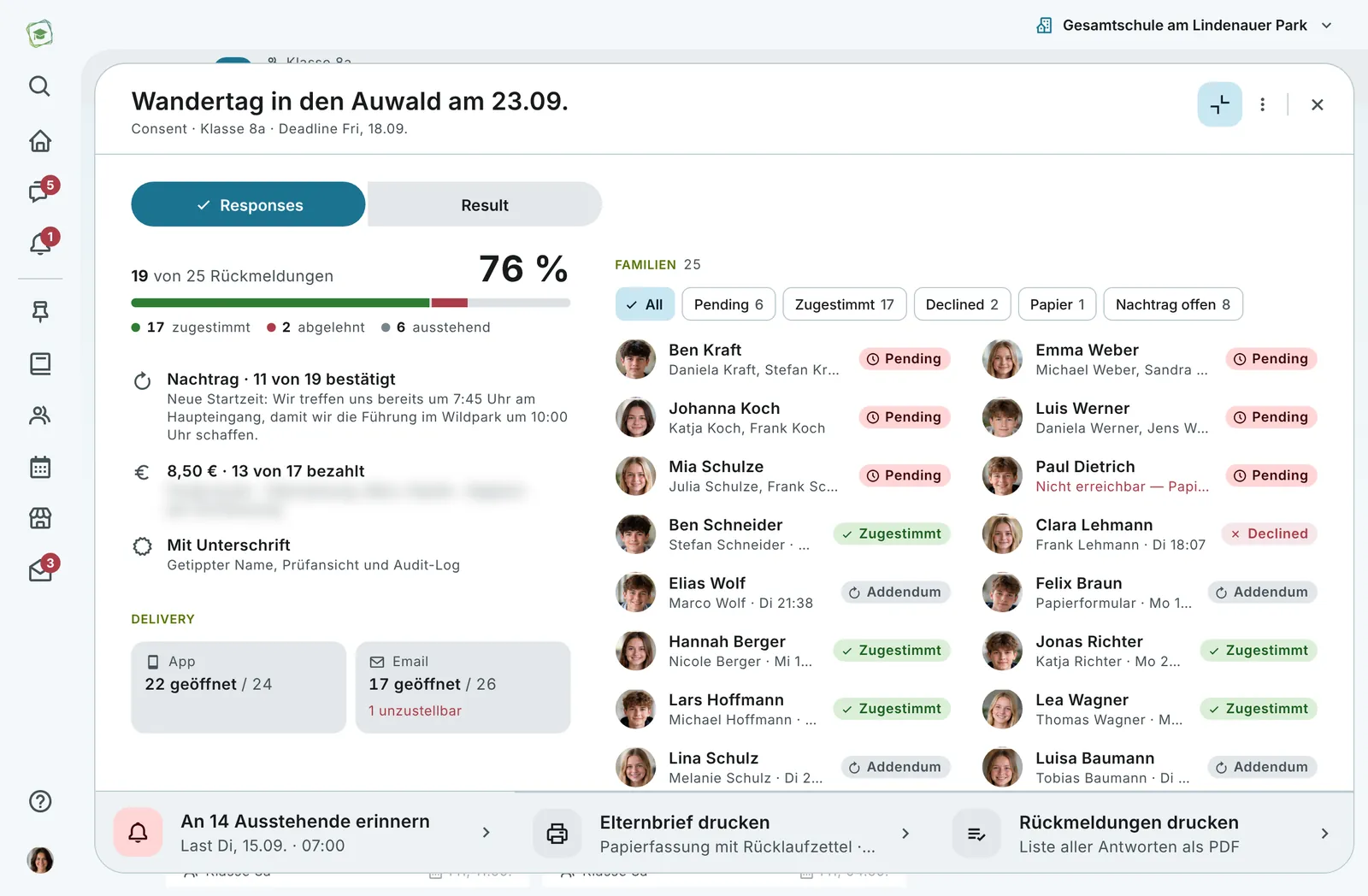
app.wecreate-campus.com · Class 8a · Parent letters
Replies to the hiking day: 19 of 25 families, contribution, signatures and delivery per channel
9:41
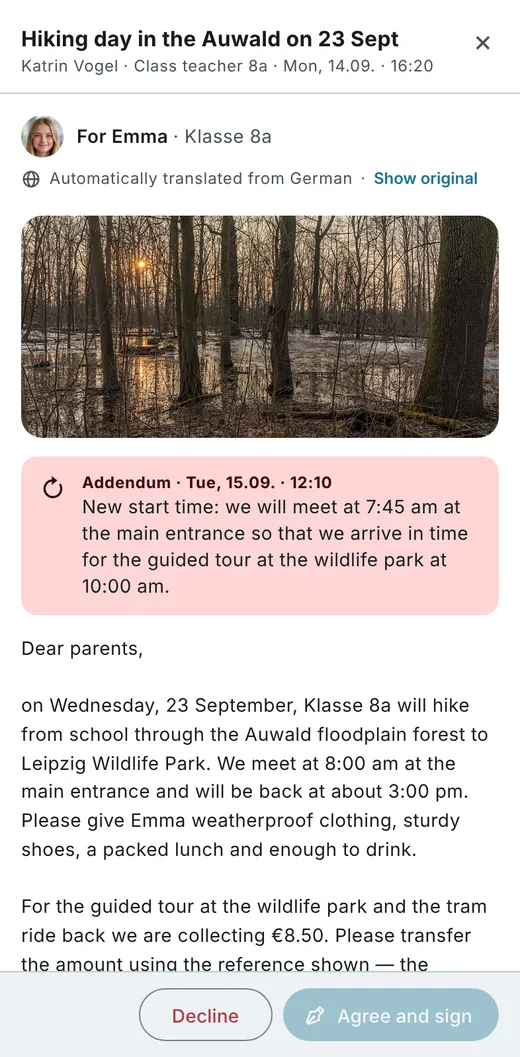
Parent letter about the hiking day in the parent app, automatically translated, with an addendum and the decline and agree buttons
Replies to the hiking day, next to the letter in the parent app · sample data
For teachers

Sent in three steps.

For families

Reply where the message arrives.

For multilingual families

Translated into the family’s language.

For school leaders

Rules and approvals.

Want to run through your next parent letter?From draft to replies, live in the demo.
See it in the demo
AI integration

With the AI of your choice.

WeCreate Campus isn’t tied to one model. States, authorities and schools decide which AI powers the learning assistant, and teachers connect their own AI app to their account via the Model Context Protocol (MCP).

Bring your own model

Your model. Your rules.

WeCreate Campus works with the AI you bring: from your federal state’s AI system and your authority’s framework contract to your own server. Approvals, data protection and usage limits follow the rules set by the state and the school.

  • State systemsConnect your state’s AI services and follow its rules
  • Your own contractsKeys and quotas from your authority or school
  • Your own serverOpen models in your own data centre
Inside the platform

The state and authority choose the model.

Mistral, Claude, OpenAI, Google’s models or your state’s own AI system: the AI features run on the model the state, authority and school approve. German providers are an option too.

  • Mistral
  • Claude
  • OpenAI
  • Google Gemini
  • Llama
  • Your state’s AI
  • Your own server

German providers

  • Schwarz Digits
  • mittwald
  • Hetzner
  • IONOS

And many more. Your provider isn’t listed? Talk to us.

In your AI app

Connect Claude, Le Chat and more.

Teachers bring courses, dates and assignments into the AI they already work with, and have it create drafts of learning units and tests there.

  • Claude
  • Le Chat by Mistral
  • ChatGPT
  • Any MCP-capable app
Where the AI works

Help with learning, preparing and finding your way.

The AI works in three places: it supports students within the learning unit, takes preparation work off teachers and answers questions about the platform.

For students

Learning assistant

Accompanies the learning unit and knows its content and the student’s own progress. It helps in steps, from a nudge to the worked approach, and asks for an attempt of their own first. It never gives answers to tests.

How far it helps is set by the authority, the school and the teacher.

NudgeWorked approach
For teachers

Creating learning content

From topic, level and your own materials it drafts the learning unit and suggests questions for exercises and tests.

It stays a draft: the teacher revises and decides.

  • Topic
  • Level
  • Materials
Draft
For every role

Help assistant

Answers questions about the platform right in the help centre, using the knowledge base.

Privacy and youth protection filters

Filters in front of every language model.

Before a request reaches the model, the privacy filter redacts personal data such as names, phone numbers or addresses. The youth protection filter checks questions and answers.

  • Personal data is redactedNames, email, phone, address, date of birth
  • Youth protection for questions and answersViolence, sexuality, hate and bullying, drugs, extremism
  • Applies to every modelIncluding the state’s, authority’s or school’s own model
Which model does your state or authority require?Bring the requirement along and we show the settings for it in the demo.
Request a demo
Digital sovereignty

GDPR-compliant. Ad‑free. Made in Germany.

Children’s data deserves protection. WeCreate Campus is hosted in Germany, uses no tracking or advertising, and stays in the school’s hands.

Where the data lives

Hosted in Germany

Developed and hosted in Germany. No tracking, no advertising, and the data stays in the school’s hands.

Who sees what

Permissions per role

Students, teachers, parents and administrators only see what concerns them. What parents may see beyond that is set by the school under Accounts & permissions.

What stays traceable

Audit log and two-step sign-in

Administrator accounts confirm sign-in with a second step. Imports and changes are recorded in the audit log; reports for school leaders and authorities contain no personal data.

Questions about data protection and operations?That is what the demo is for, data protection and GDPR questions included.
See it in the demo
Tools that think along

Four things that make daily school life measurably easier.

A learning assistant that knows your own progress. Subject areas that bring colour to the timetable. Administration that fills itself from the school records. And an AI connector that brings your existing documents along. You can try all four right here.

app.wecreate-campus.com · Messages · learning assistant
Linear functionsMathematics 8a · Learning assistant
Hi Emma! We’re on “Linear functions”. You’ve completed 2 of 5 sections, “Reading the gradient” is next. Ask me whatever you need.
Learning assistant

Ask questions without disturbing anyone.

Teachers enable the assistant per learning unit. It knows the content and the student’s own progress, and the conversation lives in Messages. It helps in steps instead of giving the answer away.

For everyone in the school day

One interface, three perspectives.

Emma sees her plan, Ms Vogel her courses, the Webers their children. Nobody sees more than they need, and nobody less.

Students

Tasks, materials and dates clearly sorted, with a simplified view for younger years.

  • Work through learning units step by step
  • Chats, groups and reactions
  • Your own progress and lunch menu

Teachers

Prepare, release and review lessons — including attendance and video teaching.

  • Create learning units and tests with a wizard
  • Attendance straight from the timetable
  • Progress, grades and oral participation

Parents

All children at one school in a single account — informed without having to ask.

  • Absences and sick notes with certificate
  • Confirm that grades have been seen
  • Messages to teachers and administration
Every tool

From the blackboard to the canteen.

Everything that makes a modern school work: considered, accessible and available in five languages.

app.wecreate-campus.com · Mathematics 8a

Every subject a room.

Every class and every course has its own room: an overview with the latest news, learning units to work through, materials in folders, assignments with submission and tests.

Talk where the work happens.

Class, group and club chats with reactions, replies, voice messages, file and image attachments and read receipts.

Teaching, even at a distance.

Video conferencing right inside the classroom: everyone sees and hears each other. Whoever speaks or shares their screen fills the stage, and the teacher can stay pinned in view. With raised hands and a counter, breakout rooms for group work and a device check before joining.

One person broadcasts, everyone watches.

Unlike the video conference, only the teacher broadcasts in a livestream: camera, screen, whiteboard or slides. Viewers chat, ask questions that can be upvoted, react and vote in live polls.

Practise and assess.

Self-checks for practice are marked automatically and never count as a grade: single and multiple choice, images and instant feedback.

Schematic illustration. We show the real view in the demo.

More tools, by area.

Which of these does your school need?In the demo we show the tools that matter to you.
Request a demo
Mobile

The whole school in your pocket.

The same platform, built for the phone: timetable, canteen, tasks and chats. With a bottom tab bar and a layout you can use one-handed.

9:41
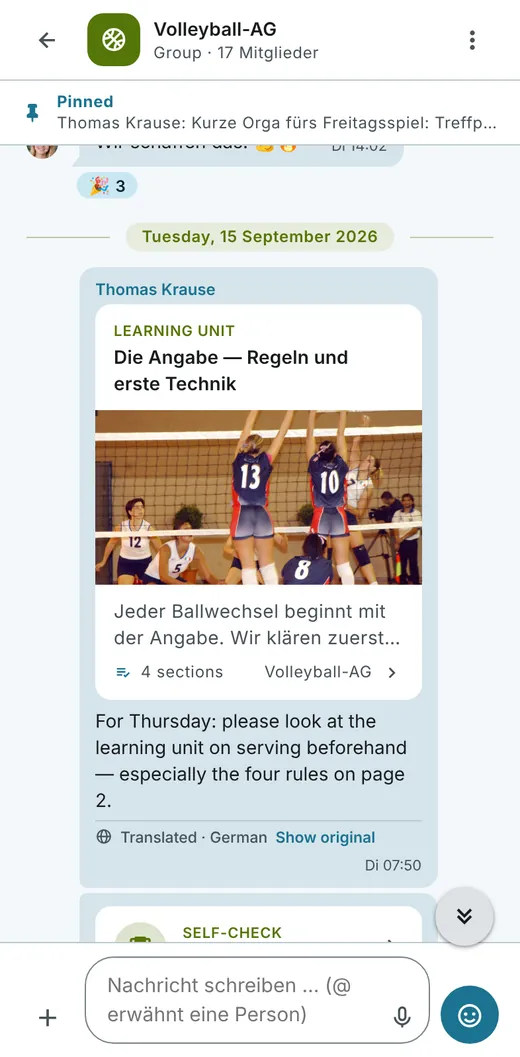
Volleyball club on a smartphone: shared learning unit in the group chat
Messaging centre
9:41
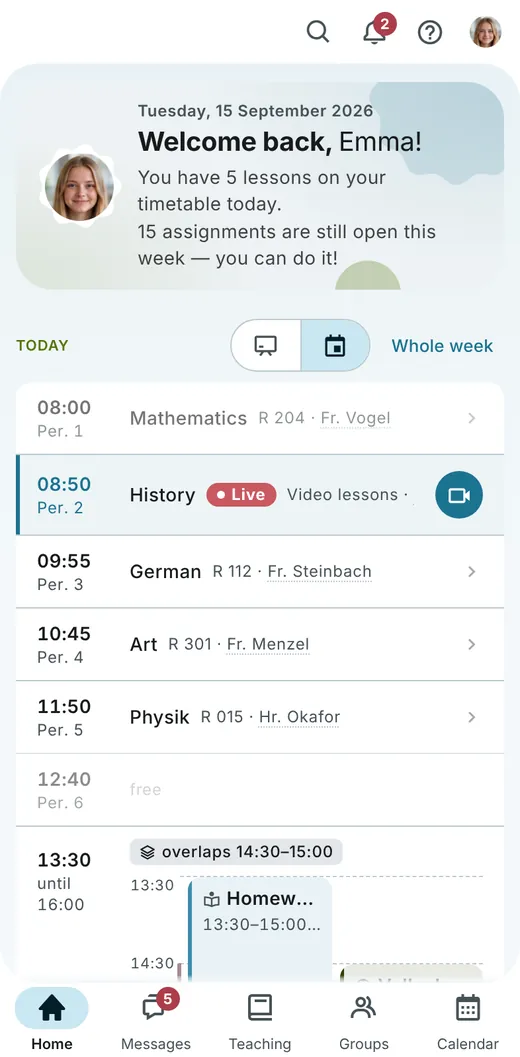
Home page on a smartphone: welcome, timetable and tab bar
Your day at a glance
9:41
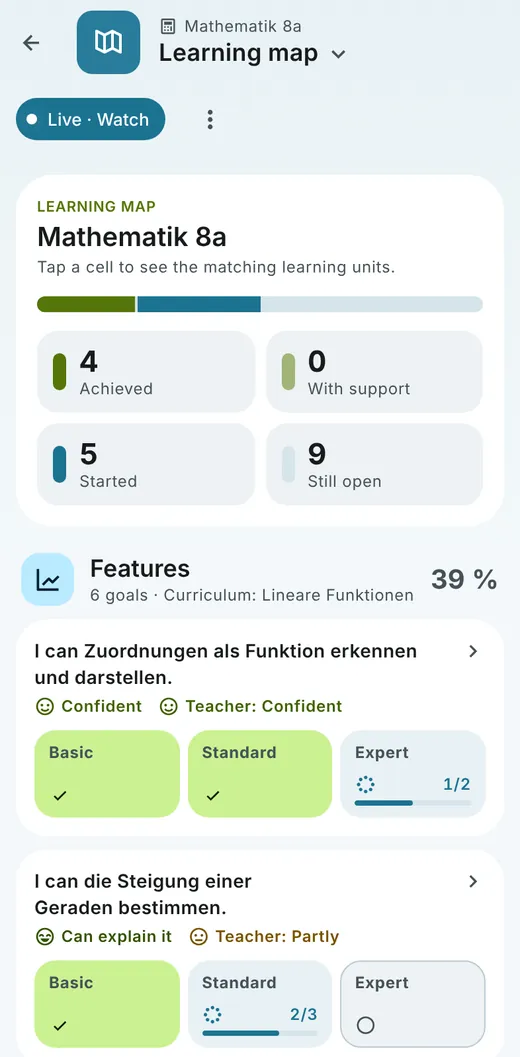
Learning map on a smartphone: progress per goal at basic, standard and expert level
Learning map
Calendar

In the calendar you already use.

Timetable, deadlines, class tests and events can be added to your own calendar app as a subscription. Set it up once, and everything stays up to date by itself.

  • One subscription, any appApple Calendar, Google Calendar and Outlook directly, any other app via the subscription address (iCal).
  • Always currentNew deadlines, events and timetable changes appear automatically.
  • Personal and protectedEveryone chooses what appears in their calendar. The address is tied to their own account and can be renewed at any time.
See it in a demo
Sample week: school dates sit next to your own. Schematic illustration.
Before you ask

Five questions every school asks.

And the short answers. Everything else we’re happy to cover in the demo.

Where is our students’ data stored?

In Germany. WeCreate Campus is developed and hosted here, uses no tracking or advertising, and the data stays in the school’s hands.

Do we have to maintain master data twice?

No. The connection to your school administration system syncs every morning: records and the timetable come from there. What was imported is listed in the import log per school and authority.

What do parents see, and what not?

One account for all their children at the same school: dates, sick notes, meals and grades to acknowledge. How much more insight parents get is decided by the school under Accounts & permissions.

What about families who speak another language at home?

The platform is available in five languages, Arabic script included. Everyone sets their own language, and messages such as chats and parent letters can be translated into it.

How do we get started?

With a personal demo: send a short request, we get back to you within 24 hours with a proposed date, and in 30 to 45 minutes we show the platform using your own use cases.

Consultation

What does the day look like at your school?

Get to know WeCreate Campus in a personal demo, tailored to your type of school and your questions. No obligation — by video or on site with you.

  • 30–45 minutes, at a time that suits you
  • For school leadership, staff or the school authority
  • Live demo with your own use cases
  • Data protection and GDPR questions included

How it works

1
Send your request

Three details are enough, everything else is optional.

2
Receive a proposed date

We get back to you within 24 hours.

3
Experience the live demo

By video or on site with you, using your own use cases.

Prefer to write to us directly? hi@wecreate-campus.comWeCreate Campus GmbH i. G. · c/o SpinLab, Halle 14 · Spinnereistraße 7 · 04179 Leipzig

Request a demo

No obligation, by video or on site

Your role
Add a preferred date and topics (optional)
What would you like to see? (optional)
Type of school
Time

We get back to you within 24 hours with a proposed date.Your request opens as a ready-made email. Send it and you’re done.

We only use your details to arrange the date with you. More in our privacy policy.

Request a demo

No obligation, by video or on site

Your role
Add a preferred date and topics (optional)
What would you like to see? (optional)
Type of school
Time

We get back to you within 24 hours with a proposed date.Your request opens as a ready-made email. Send it and you’re done.

We only use your details to arrange the date with you. More in our privacy policy.

Features New AI Security Who it’s for Every tool FAQ Sign in Request a demo